Supabase Setup
How to set up VibeFast with Supabase backend—database, auth, Edge Functions, and storage.
This guide covers manual setup for the Supabase-based VibeFast project. If you used vf init and chose Supabase, most of this is done for you.
Prerequisites
- Node.js 18+ and pnpm installed
- Supabase CLI installed:
npm install -g supabase
1. Create a new Supabase Project
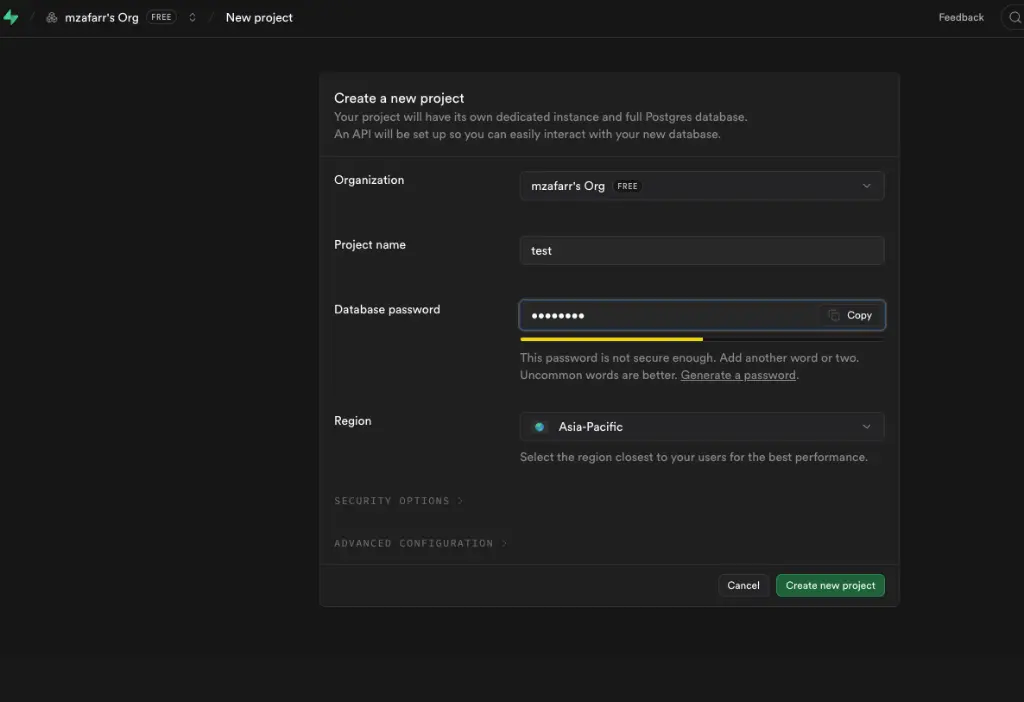
Before setting up the codebase, you need a project in the Supabase cloud:
- Log in to supabase.com.
- Create a new project, choose a name, and set a secure database password.
- Select the region closest to your users.
2. Get your Supabase credentials
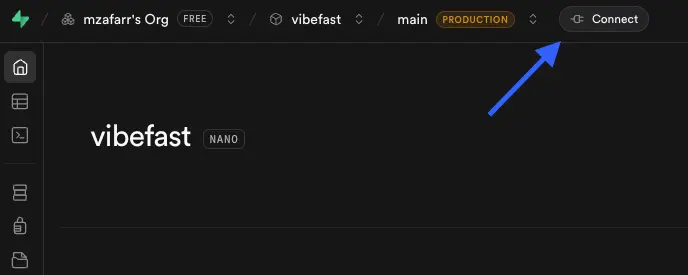
Once your project is ready, click the Connect button in the dashboard header:
Project URLs and Keys
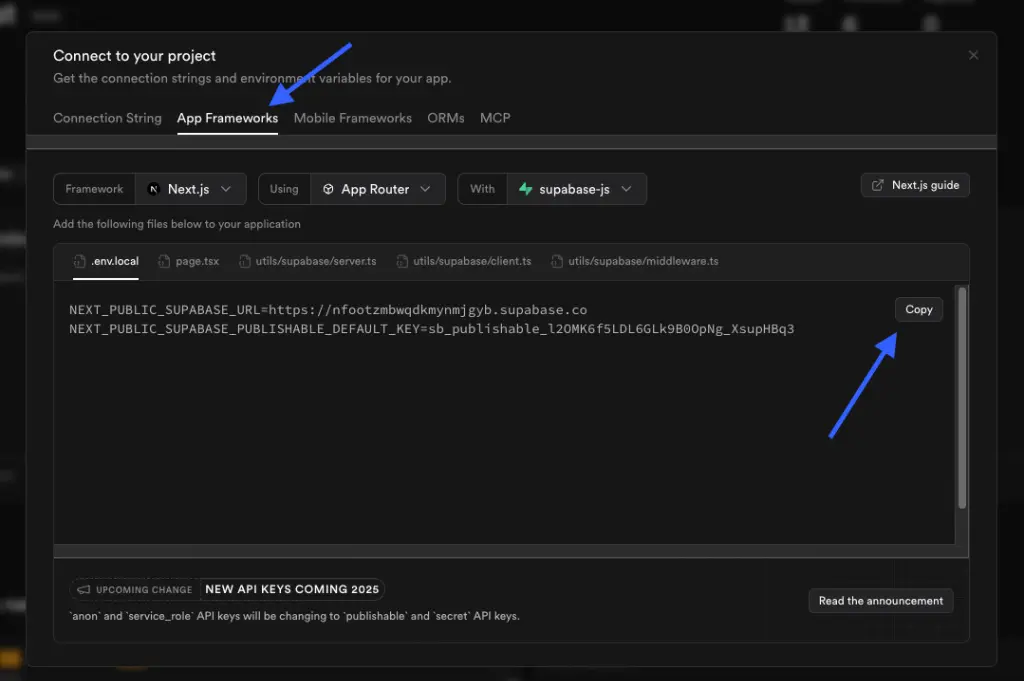
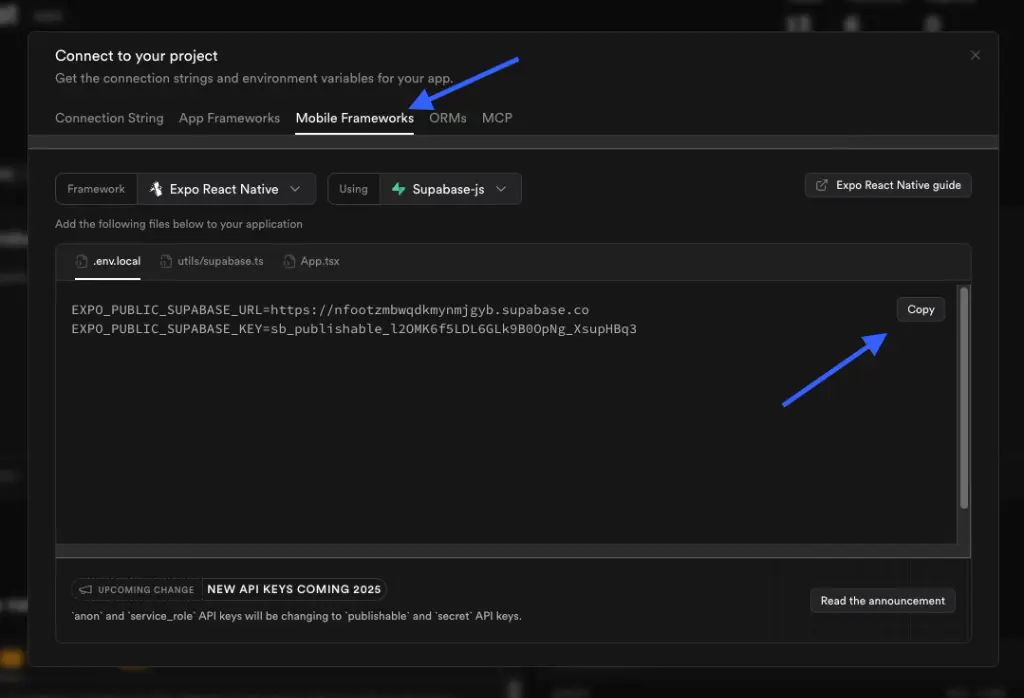
In the Connect modal, navigate to the App Frameworks (for Web) and Mobile Frameworks tabs to easily find your public and secret keys:
The NEXT_PUBLIC_SUPABASE_URL and NEXT_PUBLIC_SUPABASE_PUBLISHABLE_KEY can be found here:
The EXPO_PUBLIC_SUPABASE_URL and EXPO_PUBLIC_SUPABASE_KEY can be found here:
| Credential | Where to find |
|---|---|
| Project URL | https://xxxxx.supabase.co |
| anon public key | Safe for client-side use |
| service_role key | Server-side only, bypasses RLS |
| Project Reference | In URL or General settings |
3. Configure environment variables
cd packages/backend
cp .env.example .env.local
Edit .env.local with your values:
SUPABASE_URL=https://your-project-ref.supabase.co
SUPABASE_PUBLISHABLE_KEY=your-anon-key
SUPABASE_SECRET_KEY=your-service-role-key
SUPABASE_PROJECT_ID=your-project-ref
OPENAI_API_KEY=sk-your-openai-key
GEMINI_API_KEY=your-gemini-key
4. Run the setup script
# Login to Supabase CLI
supabase login

# Run full setup
pnpm setup
This will:
- Link to your Supabase project
- Apply all database migrations (tables, RLS policies)
- Create storage buckets (avatars, chat-attachments, recordings)
- Generate TypeScript types
- Deploy Edge Functions (chat-stream, generate-image, analyze-image)
- Configure secrets
5. Configure native app environment
Copy the native app env files:
cd apps/native
cp .env.example .env.local
Add your Supabase URLs:
EXPO_PUBLIC_SUPABASE_URL=https://your-project-ref.supabase.co
EXPO_PUBLIC_SUPABASE_ANON_KEY=your-anon-key
6. Run the servers
| Target | Command | Notes |
|---|---|---|
| Backend setup | pnpm setup | One-time: migrations, functions, secrets |
| Native app | pnpm dev:native | Starts Expo Router (use dev build, not Expo Go) |
| Web | pnpm dev:web | Starts Next.js in dev mode |
| Full workspace | pnpm dev | Runs everything via Turborepo |
Edge Functions
VibeFast Supabase includes three Edge Functions:
| Function | Purpose |
|---|---|
chat-stream | AI chat with streaming (SSE) |
generate-image | DALL-E / Gemini image generation |
analyze-image | AI image analysis |
Deploy individually:
pnpm functions:deploy:chat
pnpm functions:deploy:image
pnpm functions:deploy:analyze
Database Schema
The setup creates these tables with Row-Level Security:
users— User profiles (extends auth.users)conversations— Chat conversationsmessages— Chat messagespurchases— Credit purchasesdevice_grants— Initial credit grantsrecordings— Audio recordingsimage_analyses— Image analysis resultsgenerated_images— AI-generated images
Troubleshooting
"Project not linked"
supabase login
supabase link --project-ref YOUR_PROJECT_ID
Edge Functions not working
- Check secrets:
pnpm secrets:list - Check logs in Supabase Dashboard > Edge Functions
- Redeploy:
pnpm functions:deploy
RLS blocking queries
Ensure you're using an authenticated client. The anon key alone won't pass RLS policies that require auth.uid().
Keep the CLI option open
Even after manual setup, you can use the CLI:
vf login --token YOUR_LICENSE_KEY
vf add chatbot
vf remove tracker-app
Found an issue or bug in the docs?
Help me improve! If you spot any errors, typos, or have suggestions, please let me know.
Reach out on X/Twitter @zafarbuildzz